
Canadian Migraine Tracker Support

How to update to the most current version of Canadian Migraine Tracker

Please follow the instructions below after updating the app from the Google Play Store.

Scenario 1: Your Account is Logged Out

  1. Open the Google Play Store
  2. Search for the app and install the latest update
  3. Open the app
  4. Log in using your existing username and password

Scenario 2: Your Account is Remains Logged In

  1. Open the Google Play Store
  2. Search for the app and install the latest update
  3. Open the app
  4. Wait for the app to automatically log you in

Login Issue After Update

Please Force-close the App by completing the following steps:

  1. Tap the Recent Apps button on your device
  2. Locate the app
  3. Swipe the app away to close it
  4. Reopen the app

If the Issue Persists
Reinstall the App

  1. Press and hold the app icon
  2. Tap “Uninstall”
  3. Open the Google Play Store
  4. Reinstall the app
  5. Open the app and follow Scenario 1

If the issue continues, please contact support for further assistance.

Please follow the instructions below after updating the app from the Apple App Store. 

Scenario 1: Your Account is Logged Out 

  1. Open the Apple App Store
  2. Search for the app and install the latest update
  3. Open the app
  4. Log in using your existing username and password


Scenario 2: Your Account is Remains Logged In  

  1. Open the Apple App Store
  2. Search for the app and install the latest update
  3. Open the app
  4. Wait for the app to automatically log you in


Login Issue After Update
Please Force-close the App by completing the following steps:  

  1. Swipe up from the bottom of the screen (ordouble-pressthe Home button on older devices) 
  2. Locatethe app 
  3. Swipe the app away to close it
  4. Reopen the app


If the Issue Persists 

Reinstall the App  

  1. Press and hold the app icon on your device
  2. Tap “Remove App,” then select “Delete App”
  3. Open the Apple App Store
  4. Reinstall the app
  5. Open the app and follow Scenario 1


If the issue continues, please contact support for further assistance. 

Frequently Asked Questions

Usually what happens is that the same migraine attack will fluctuate during the day. It can also be treated and come back (that’s called a recurrence).

The way to use the Tracker is to enter the worst degree reached on that 24h day according to the 0-1-2-3 technique. You can decide to define the day as you wish, starting at midnight, at 6AM, what fits your routine best.

The tracker is built to be easy to summarize and provide an overview. This means that some details cannot be analyzed. That’s the fine balance between precision and synthesis!

A typical migraine attack duration is 4 to 72 hours.  During a day, the pain can go away and come back latter.

You can always add a note to add more details about your migraine.

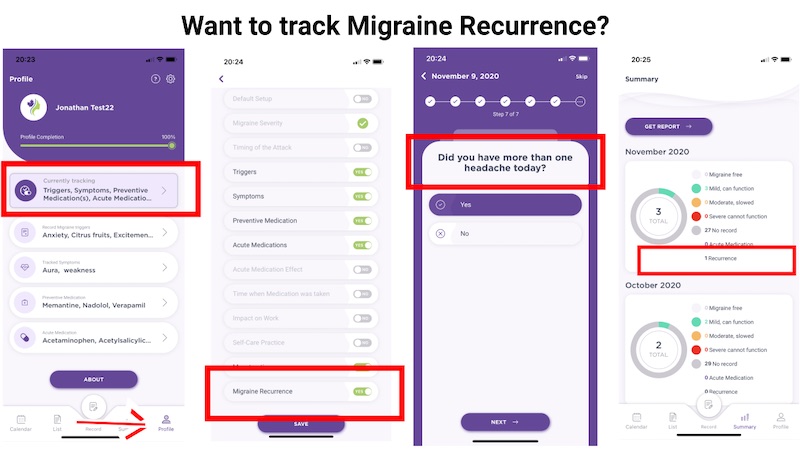
Did you know that since version 5.0 of the app, it is now possible for you to record Migraine Recurrence?  Here is how:


1) Start to enabling this feature.


  • Go to Profile,
  • Currently Tracking
  • Scroll down until you see Migraine Recurrence
  • Switch the toggle to Yes
  • Hit the Save button.


2) The next time you enter an attack, answer the question “Did you have more than one headache today?”.


3) Migraine Recurrence will now show in your reports.


Please talk to your physician about the best way to report migraine recurrence.


Migraine is way more than pain. People report very diverse symptoms. It is impossible to account for this diversity in an app. The 0-1-2-3 scale is based on function. It represents the impact of all your combined symptoms on your day.

As a side note, the 0-10 pain scale is losing popularity even in the pain world, as pain is very subjective. Research uses more and more scales based on concrete ability to function.

The 0-1-2-3 technique also allows an easier summary of the situation. Making statistics with 0-10 recorded many times per day would be difficult!

This problem was reported by many users with the pilot version and it should have been fixed now. Please let us know if you encounter bugs with this function.

At present time, the Tracker does not offer a report of this information in a summary form. If there is interest for such a report, we could find funding to build it. This is a work in progress! We realize that it is important to access a summary of what you recorded. We started with a simple option focusing on basic information usually used to guide treatment adjustments, but we could expand.

Migraine Buddy is a leading app that has millions of users! Why build another App then? The reason was simple. The Canadian Headache Society heard many comments, both from patients and physicians, that Migraine Buddy was asking for too much information, was sending too many reminders and was not easy to use for communication in the clinic. That is why the tracker is more simple and offers many ways to send reports to health care providers. It also belongs to a Canadian scientific society. That could allow us to produce Canadian data for advocacy, and also to use it for research (which is being done at present time in Calgary for a project on cannabis!).

To delete your account, use one of the following.

  1. From the App, go to the Footer Menu ->Profile -> Settings (gear icon) -> Delete account
  2. Send a request to [email protected]
  3. Use the form below with the message ‘Please delete my account’.

We will then delete your account.  All the data you ever entered will be deleted from our database.  

Please allow 7 days for your request to be processed.

Your data are deleted when you delete your account. 

To delete your account, please use one of the following.

  1. From the App, go to the Footer Menu ->Profile -> Settings (gear icon) -> Delete account
  2. Send a request to [email protected]
  3. Use the form below with the message ‘Please delete my account’.

We will then delete your account.  All the data you ever entered will be deleted from our database.  

Please allow 7 days for your request to be processed.

Tutorials

Create and Modify Your Profile

Enter an Attack

Learn more about the MigraineTracker App

Learn from Dr. Kingston, a leading headache specialist about how to use the Migraine Tracker app and the benefits the app can offer.

Hear from Christie Tait, MN, NP-PHC, Nurse Practitioner specialized in migraine, and director of Structure Clinic Toronto, as she shares the benefits and wide range of uses of the Migraine Tracker app.

Hear from Marzieh Eghtesadi about the benefits the app can offer (French).

Known Issues


2025-08-07 New App Auto Logout Feature

Version 8.0 of the app, released on July 21 2025, introduces a new security feature. When the app is closed, it will prompt you to log in again.

The app is closed when:

  1. You click and drag the window upwards (swipe up).
  2. When you restart your phone.
  3. When your device closes unused apps, for example, to save battery life.
  4. If the app is not closed, you will not be prompted to log in again.

Here are some tips to ensure the app doesn’t close accidentally:

iOS (iPhone)

  • Turn on this option : Phone Settings -> Apps -> Migraine Tracker -> Background App Refresh


Status : “Remember Me” option added in version 8.1


2025-08-07 Incorrect Chart Colors on the Summary View Page

The colors are incorrect on the Chart of the Summary View.
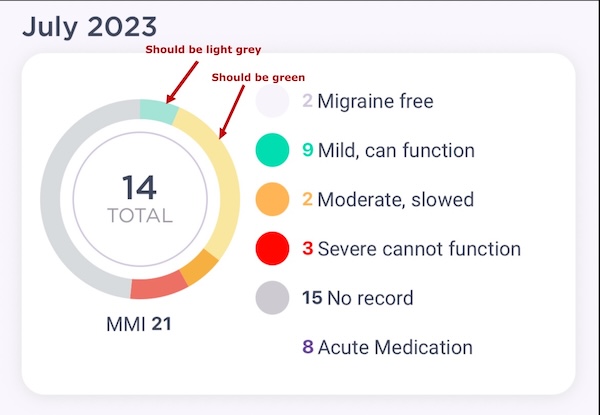
The colors on the right column and the number of records are OK.

The colors are ok on the Migraine Summary Report (PDF) that you sent to your doctor.

Status : Fixed in version 8.0.1


2025-08-16 Incorrect MIDAS questionnaire

Please note that the MIDAS questionnaires is currently incorrect. We will fix this in our next version. You may continue to fill the HIT-6 questionnaire.

Status : Fixed in version 8.0.2


2025-08-16 APP not compatible with the Samsung Galaxy Navigation Bar

The Samsung Galaxy navigation bar can overlap buttons of the Canadian Migraine Tracker.
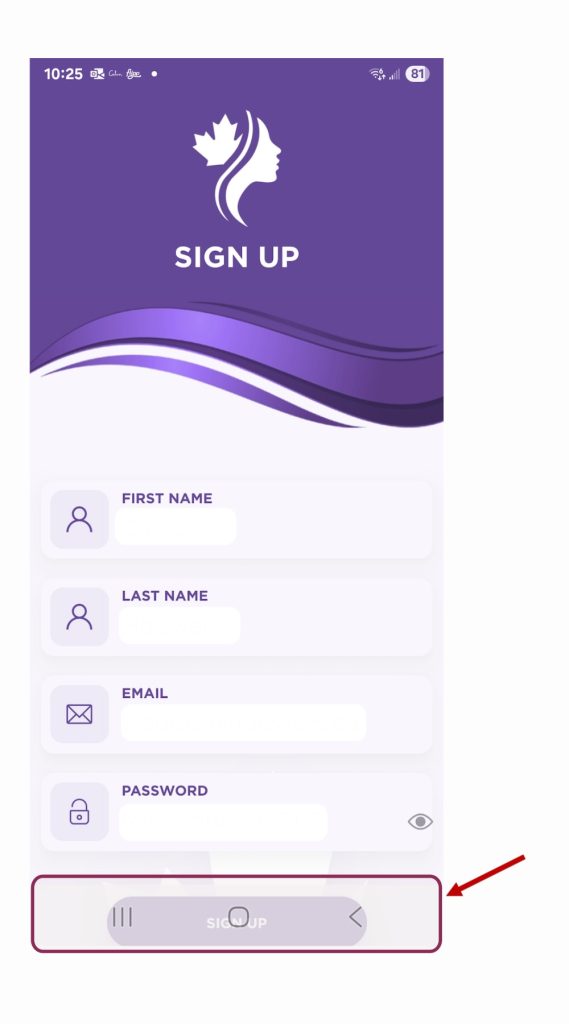
Workaround : Disable the Samsung Galaxy Navigation Bar.

Leearn More Here.

Status: Fixed in version 8.1


2025-08-31 App crashing when adding 2 acute medications at the same time

App crashes when you try to add two acute medications simultaneously from your profile. This issue occurred when adding medications by category.

Status : Fixed with version 8.0.3

Having issues? Submit a message.

You can use this form to contact us. Please note that we will not answer any medical related question. We do not provide medical services or referral. Please contact your health care provider if you need medical assistance.

Contact Information


Unsure how to find your device model or os version? Click here

Thank you for submitting your support request.   We will try our best to get back to you as soon as we can.

Thanks,

-The Migraine Canada Team